The beginning...
'Explorers, we are going to be learning how to create our own program to support our understanding of Kipling's 'Just So Stories!'
'Now your talking Mrs J!' was the response from one of the children...
Tuesday, 12 May 2015

Sunday, 10 June 2012
ICTOPUS sharing good practise!
I have just had another article published on ICTOPUS on our schools use of KLP! Please take a look if you think the ideas may work for you.
Here is the link:
http://www.ictopus.org.uk/index.php?sc=1
The current article is regarding our world links (SPG138), I have also had articles on our KLP usage in SPG76, 84 and 95!
I do hope they may be of use to you.
Here is the link:
http://www.ictopus.org.uk/index.php?sc=1
The current article is regarding our world links (SPG138), I have also had articles on our KLP usage in SPG76, 84 and 95!
I do hope they may be of use to you.
Thursday, 7 June 2012
Panarama!

Just decided to take the plunge and re-create our school website using the possibility of creating a public space on KLP! Up until now, I have been managing both KLP and our website - too much to do!
So, with a blank canvas (so to speak) and loads of inspiration, I set to work!
Having managed to attend Tim Rylands keynote speech at the recent ICT conference I was awe inspired to get going on ‘all’ (no I know you can’t do it all at once!) his fabulous ideas. The picture above, however, was one of the easiest, most effective and versatile pieces of ICT that I have created in a while…
As Tim showed with ease the creating of a Panarama, I simply couldn’t wait!
· I stood in the best spot on our playground with trusty Flip cam in hand
· I filmed a very steady 180 degrees arc around my position
· Uploaded the image into flipshare
· Cut the various snapshots as necessary
· Opened Microsoft Ice (free download)
· Dragged in the relevant images
· Watched as in seconds the Panarama was created
· Cropped
· Uploaded it onto KLP where our new school website is being created
· Simples!
I am very impressed with the result and it looks great at the head of our new website!
visit: www.timrylands.com for further inspirational ideas as well as Panarama!
visit: www.timrylands.com for further inspirational ideas as well as Panarama!
Friday, 20 April 2012
DCC ICT conference...
WOWEE!
What an amazing day we had at Swanwick Hayes yesterday!
Eight of our boys year 4, 5 and 6, presented a series of work shops to teachers, ICT coordinators, Head teachers, consultants and even our KEYNOTE speaker Mr Tim Rylands - a gentleman whom both my children and I have become huge fans of! As we delivered our final workshop for the day, he was blogging to the world all about it - read about it at www.timrylands.com
Here's a snippet...it may be useful...
Our workshop delivered by myself and the boys was to entice the delegates in the wonder of KLP and how it thoroughly engages all of our children at Eureka into the digital world of learning! The power of web 2 technologies developing awe and wonder, a sfae and secure environment of an ever increasing opportunity to learn independently, push the bounderies and barriers to enjoy our time in our learning journey and be able to share it with the whole school community.
The boys were sharing and explaining very confidently how powerful a tool KLP is, and all the different pages and spaces we have and continue to develop to enhance their Literacy skills across all year groups and all abilities.
A truly memorable experience for both myself and the youngsters!
What an amazing day we had at Swanwick Hayes yesterday!
Eight of our boys year 4, 5 and 6, presented a series of work shops to teachers, ICT coordinators, Head teachers, consultants and even our KEYNOTE speaker Mr Tim Rylands - a gentleman whom both my children and I have become huge fans of! As we delivered our final workshop for the day, he was blogging to the world all about it - read about it at www.timrylands.com
Here's a snippet...it may be useful...
Our workshop delivered by myself and the boys was to entice the delegates in the wonder of KLP and how it thoroughly engages all of our children at Eureka into the digital world of learning! The power of web 2 technologies developing awe and wonder, a sfae and secure environment of an ever increasing opportunity to learn independently, push the bounderies and barriers to enjoy our time in our learning journey and be able to share it with the whole school community.
The boys were sharing and explaining very confidently how powerful a tool KLP is, and all the different pages and spaces we have and continue to develop to enhance their Literacy skills across all year groups and all abilities.
A truly memorable experience for both myself and the youngsters!
Wednesday, 15 February 2012
FILMS we love 'em!!!!
This term we have been learning about our theme May the Force be with you!!! Lends itself very nicely to a whole host of things - especially film production!!!
We watched the trailor for APOLLO 13 - after I had added it to our KLP page for our new topic - of course!!! We can view over and over again - for a whole variety of reasons.
We discussed salient points, action, characters, empathised with them, looked at mood, camera angle...
Next - I added some snap shots form the trailer into various wikis - children chose the characters, acted out the scene and we worked on the charactreisation, speech bubbles and then speech marks for narrative!

Resulting form that event, the children planned their films in small production teams using a film board scene planner. Great enthusiasm, team work and fabulous imagainery space events...
To complete their film, the children then had to choose - the usual - movie maker, photo story, digiblue.....or a couple of new 'free' cloud based pieces of sortware...
We tried Zooburst and Animoto! What a hit!!!! After creation, I collected the embed code, added each html code to a text editor and created our film page...
We watched the trailor for APOLLO 13 - after I had added it to our KLP page for our new topic - of course!!! We can view over and over again - for a whole variety of reasons.
We discussed salient points, action, characters, empathised with them, looked at mood, camera angle...
Next - I added some snap shots form the trailer into various wikis - children chose the characters, acted out the scene and we worked on the charactreisation, speech bubbles and then speech marks for narrative!
Resulting form that event, the children planned their films in small production teams using a film board scene planner. Great enthusiasm, team work and fabulous imagainery space events...
To complete their film, the children then had to choose - the usual - movie maker, photo story, digiblue.....or a couple of new 'free' cloud based pieces of sortware...
We tried Zooburst and Animoto! What a hit!!!! After creation, I collected the embed code, added each html code to a text editor and created our film page...


After embedding into a page full of films....I added the relevant code to each child's eportfolio too! They then have their own - to keep! Plus, invited all the school to add a film review of 2 stars and a wish to discussion board question linked to the film camera! You could easilly do this to a survey too! And be more specific with the questions!!!
A super literacy topic - that encompassed so so much more...bets of it was the whole class -mainly BOYS - were VERY engaged!!!!!!
Sunday, 25 September 2011
I'VE GOT WIKI -ITIS AGAIN!!!!!
New term - so try something a little different with KLP!!!!!!
Using a wiki page Library has got to be one of the easiest of the web 2 technologies on any Learning Platform! [[title]] what could be easier than this to create a new virtual page???
My new Learning team (year 4 and 5) - who have had some exposure to wikis in their previous Learning team, have taken to creating their own pages like a duck to water!
New year - so new wiki library -
Ecologists wiki library 2011-12
[[Literacy]]
[[Write on Reading]]
[[Fire it Up!]]
[[Home Learning]]
The above just being the basic 'contents' or Home page to start with...
[[Poetry]]
was added to the Literacy page...
[[Canary]]
[[Jetsam]]
[[Our own poems]]
Then added to that...(for those of you that are new to creating wikis - the [[ ]] surrounding the title tells KLP that this is a new page!) Canary and Jetsam being poems we were studying, so this was available for IWB, the children during their learning, at home and so on...
In the Our own poems page, the whole class then went into 'edit' and created their own pages...
Our own poems
[[Bill]] [[Bob]] [[Bert]] [[Betty]] and so on....
They then have their own contents page in which to create their pages for their learning...we made a special point about them being very careful NOT to name ANY page the same or the same as anyone else...for example...if Bill was writing his own version of Canary, his page would be
Bill's own poems
[[Bill Canary]] and so on...
Simples!
Friday, 2 September 2011
Our Headteacher reflects on our Learning platform!
It was only three and a half years ago that the acronym ‘KLP’ first fell on my (not so deaf) ears. I had heard of the ‘forward thinking’ schools, which were already throwing phrases such as ‘digital native’ and ‘learning platform’ around the staff room as a natural part of day to day lingo, but had never considered that could be us!
Then the journey began….one day myself and my ICT leader, along with fellow colleagues were sitting in the procurement room debating the pros and cons of each learning platform (myself with very little clue being gently guided by my techie friend!!) and the next......here we are with a fully integrated, secure learning platform, enjoyed by our pupils, staff, parents and even the Governing body that fully enhances Teaching and Learning at our school!
When asked to write this piece, I started to consider how we actually got to where we are today. After much thought, decided it was due to a recipe of inspirational leadership from the school’s ICT leader, staff who are always willing to ‘give it a go’, well planned CPD, careful ongoing support, enthused children and parents that didn’t mind being gently nagged.
Then finally me, the head….basically the ‘yes’ man, or should I say woman, who agreed to the inspirational leadership of my ICT leader to manifest itself every day in the life of Eureka.
Do I regret it? Not one bit!....I will say ‘yes’ a thousand times over, if it generates the enthusiasm and learning opportunities that has occurred so far at our school. To be quite frank, I would say a thousand times ‘yes’ for you too, if I thought it would open your eyes fully to the potential that this safe, online space has.
So how has it been used at Eureka?
In lessons KLP is the home to learning journeys, web links, web conferences, wikis, blogs, questionnaires, quizzes, games, home learning, video clips, personalised work spaces to name a few.
However, KLP in my opinion can go far beyond…..creating pupil assessment evidence portfolios linked to APP, holding pupil data, organising parent and pupil questionnaires, a forum for our school ministers and ‘Team 007’ a pupil learning and teaching team, all of which can be created by staff and in many cases the pupils themselves.Then of course there are the staff and governors spaces which hold the key to all school documentation, allowing us to use this space to communicate and collaborate daily, as well as delivering staff and Governors meetings. The parent space has a wealth of opportunities with regular blogs as to the learning which is occurring in the school, newsletters, notices and live areas during residential visits that means the parents don’t need to miss out on what their child is doing when away from home for the first time.
Do I think we have exhausted KLP? Absolutely not, I welcome with open arms any future developments, and if I may give you tips to success:
Trust your colleagues, they often know more than you!
Don’t be cautious; be considered, there is a difference!
Listen to the children….they will tell you!
And finally…….
Be a ‘yes’ man (or woman!), open your eyes….and enjoy!"
Then the journey began….one day myself and my ICT leader, along with fellow colleagues were sitting in the procurement room debating the pros and cons of each learning platform (myself with very little clue being gently guided by my techie friend!!) and the next......here we are with a fully integrated, secure learning platform, enjoyed by our pupils, staff, parents and even the Governing body that fully enhances Teaching and Learning at our school!
When asked to write this piece, I started to consider how we actually got to where we are today. After much thought, decided it was due to a recipe of inspirational leadership from the school’s ICT leader, staff who are always willing to ‘give it a go’, well planned CPD, careful ongoing support, enthused children and parents that didn’t mind being gently nagged.
Then finally me, the head….basically the ‘yes’ man, or should I say woman, who agreed to the inspirational leadership of my ICT leader to manifest itself every day in the life of Eureka.
Do I regret it? Not one bit!....I will say ‘yes’ a thousand times over, if it generates the enthusiasm and learning opportunities that has occurred so far at our school. To be quite frank, I would say a thousand times ‘yes’ for you too, if I thought it would open your eyes fully to the potential that this safe, online space has.
So how has it been used at Eureka?
In lessons KLP is the home to learning journeys, web links, web conferences, wikis, blogs, questionnaires, quizzes, games, home learning, video clips, personalised work spaces to name a few.
However, KLP in my opinion can go far beyond…..creating pupil assessment evidence portfolios linked to APP, holding pupil data, organising parent and pupil questionnaires, a forum for our school ministers and ‘Team 007’ a pupil learning and teaching team, all of which can be created by staff and in many cases the pupils themselves.Then of course there are the staff and governors spaces which hold the key to all school documentation, allowing us to use this space to communicate and collaborate daily, as well as delivering staff and Governors meetings. The parent space has a wealth of opportunities with regular blogs as to the learning which is occurring in the school, newsletters, notices and live areas during residential visits that means the parents don’t need to miss out on what their child is doing when away from home for the first time.
Do I think we have exhausted KLP? Absolutely not, I welcome with open arms any future developments, and if I may give you tips to success:
Trust your colleagues, they often know more than you!
Don’t be cautious; be considered, there is a difference!
Listen to the children….they will tell you!
And finally…….
Be a ‘yes’ man (or woman!), open your eyes….and enjoy!"
Thursday, 16 June 2011
...and SPREADS!!!!!!!
Two other schools have also started using KLP with us - a school from Stoke-on -Trent has literally started their WHO ARE YOU? blogs today...
Their teacher heard me speaking in Sheffield about our collaboration and communication with Florida through KLP, and wondered if we could also communicate with him and the students!
Of course! No problem!
I created a page, set up a Blog and a set of discussions - sorted the permissions out so that they could use that part of our Learning Platform and we're away!!! The Time Travellers will be chuffed to bits when they log in tomorrow to see who has introduced themselves!
The beginning of a great friendship!
These two classes - as there is no time difference - will -I am sure be web conferencing wuite often!
I have also set up a similar page for our Explorers who are going to do some collaborative learning with a school just across the Midlands from us in Dudley! IT's all so exciting!
More web conferencing....
WEB CONFERENCING SPREADS!!!!
It is fantastic...we had our 2nd web conference with Double Branch recently after Goldie (our mascot) had arrived - he looked so different in his basketball top!!! We are so used to seeing him in his school uniform! The children were really excited to see him and find out what he'd been up to!!!! A few days later their mascot Woody arrived to sepnd some time with us!
A huge parcel arrived...full of all sorts of Disneyland and Florida goodies - it was a very special moment! All of Eureka's children also recieved a special hand written letter that was in reply to the one they had sent! Brilliant!
All this thanks to RM's amazing safe and secure Learning Platform - whatever did we do without it??????
Thursday, 10 February 2011
IN THE NEWS FROM FLORIDA!
Great surprise today when I received the link to the local paper of the school that we have been sharing our Learning Platform with...not sure that I like being referred to as Johnson! But never mind! Here is the link if you are interested...
http://cnewspubs.com/?p=5312
http://cnewspubs.com/?p=5312
Wednesday, 9 February 2011
KLP CONFERENCING WITH FLORIDA!

WHAT A TRULY AMAZING EVENT!!!!!
The image above shows both classes side by side taking part in the web conference - through our very safe Learning Platform - KLP!!!!! This was then transposed onto the IWB so that we could all see each other.
It took some setting up - 5 hours time difference; they don't start school until 10.00am; we are just about to go home then! No matter! Florida's children arranged to come in 1 hour early so that they could speak to us live - WOW!

Our local newspaper came in to witness the event first hand and their photographer too - of course! Our school mascot Goldie and our resident badger - Boris - were both there to join in with the event!
Check out the full article at -
Further developments coming soon....we have lots of ideas...
KLP SHARING WITH FLORIDA!
Hi all, can't believe it has taken me this long to post this to be honest...one of the highlights of my teaching at Eureka...
We have set up a link with a school in Florida - through KLP!!!!!
How?
- I created a log in for their teacher (by the way - we initially met on e-pals!!!)
- Set up a page for us to collaborate in...

- With a blog where we have all introduced ourselves - I can't believe it - every one of my class and our friends across the Atlantic have added a post explaining themsleves...they are commenting too and asking each other questions...
- We also have a set of discussions where we are sharing differences between schools, dress code, meals, clubs and any other things we think of!
- We each have a photo slide show here too!
- Another area we are developing, is a shared narrative! We have a wiki called 'Adventures Across the Atlantic' that we are writing together.
We have loads of other ideas...all of which are about 'engaging - enjoying - enhancing' the learning of our children! So far it has been a tremendous success!
Thursday, 18 November 2010
LEA GREEN HIT!!!!! PARENTS ON LINE!!!!!!
WHAT A TRUE SUCCESS!!!!!
I honestly cannot get over the three days we spent at Lea Green!
We took netbooks with us, each evening we set up in the conference room and shared the days events with our families, friends and teachers back at school!
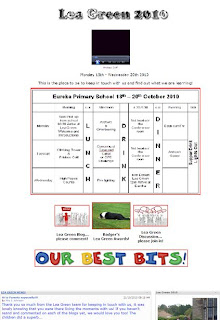
Some of the above was created before we went - some afterwards!!!!
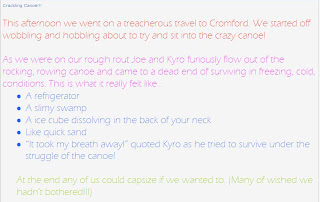
Seeing the excitement in the faces of the children when they saw that their parents had added to a discussion or commented on a blog post was amazing!!! A great opportunity for learning and experiences to be shared with their families and opportunities to continue their learning outside the classroom, extending their literacy skills and esceeding expectations - truly fabulous!
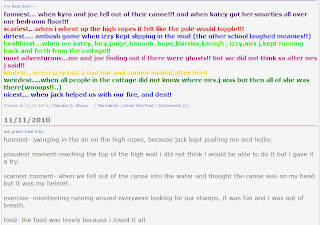
After the event we blogged about our best bits...and I presented them with virtual awards!!!!!
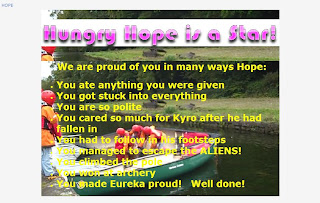
All I can hope is that this is the start of a really good school/parent virtual partnership!
Sunday, 17 October 2010
KLPing from Lea Green!
Hi all...
Not seem to have blogged in a while...
Off to Lea Green for three days tomorrow with 18 wonderful year 5 and 6 children...
We are taking our netbooks with us!
I have created a page on KLP for us, the school and the Parents - so we can keep in touch whilst we are there!
We have the timetable on the page so that everyone knows what we are up to!
A discussion area, a blog that the children are going to post in, news and slideshow ready to take our action shots!
We are all so excited...we are taking our flip cam too, so we shall be uploading video.
Hopefully, we may even get to web conference if anyone else is online when we are!!!
I shall let you all know how we get on!
Jacqui
Not seem to have blogged in a while...
Off to Lea Green for three days tomorrow with 18 wonderful year 5 and 6 children...
We are taking our netbooks with us!
I have created a page on KLP for us, the school and the Parents - so we can keep in touch whilst we are there!
We have the timetable on the page so that everyone knows what we are up to!
A discussion area, a blog that the children are going to post in, news and slideshow ready to take our action shots!
We are all so excited...we are taking our flip cam too, so we shall be uploading video.
Hopefully, we may even get to web conference if anyone else is online when we are!!!
I shall let you all know how we get on!
Jacqui
Friday, 10 September 2010
WOW MOMENT!!!!!!
We had to close the school today - burst water main down the road!!!!
I promptly logged on, added news to explain, targetted it to members
(whole school site as EVERYONE has permission to view that)
...the news soon spread as one or two people logged into KLP to see what had changed or to do their Home Learning/extend their learning...
behold, they saw my message as soon as they logged in!!!!
One person rang to check that the message on KLP was corrected...
BLESS!
Techno power!!!!
Thursday, 19 August 2010
Creating for new year...
Gosh, I shall miss my techi children from last year - they were brilliant!!!! So ICT skilled and capable - year 4 and 5!!! However, life (as they say) moves on, and so does the learning team!
These last few days been busy creating new things:
RE Interest Space!
Our RE coordinator has made the decision that the whole school will focus on a particular religion each term - easy to manage, resource, coordinate, evaluate... As one of those difficult to teach topics we thought it would be great to have an RE interest space for the whole school so that great online resources could be shared; children can collaborate on a common theme; older children can support younger; everything would be 'stored' in the same place...
A generic 'home page' if you like has been created (incidentally by a new member of staff, who was given a quick tour of KLP, shown where all our DCC How to sheets were, and he was off!!!!), with links to a seperate page to all religions, a multi faith calender and a very interactive game where a cute teddy explains the basics of each religion to the children (this is added in page viewer -the site is safely 'nuzzled' in KLP!


The animated links above, transport the children to different pages for each religion...we are studying Judaism this term, therefore that page is being populated with video, slideshows, links, games and interactive pages to support the learning and investigating the subject.
To top it all...just spent the day installing new pc's at school!!!!!
KLP is going to be even better from now on!!!!!!
CAn't wait!
Wednesday, 18 August 2010
Holidays - what holidays?
A perfect time to get all those niggling ICT jobs done...completing/tidying up from last term...
- Added images of evidence to the children's eportfolios - I use a flip cam all year round (excellent bits of kit!), filming away for showcasing, annalysing, reviewing etc...it is also so easy to take a snapshot off the flip and use in the children's shared files! Taking pics off the flip also means that the snapshots are actual real evidence - not contrived or posed - natural learning taking place! What I have done is created a slide show for the class - ending up with 2 pages per child. Each useful snapshot is added to the pages for the child, a statement to acompany (AF where appropriate), and the 2 pages then added into the child's shared files in a folder depicting the year group the child was in when the evidence was gathered. Great evidence for us; super place to share with Parents, next teahcer, next school...
- Ensuring all IEPs and Gand T profiles are up to date, reviewed and reniewed ready for the next teacher (we carry ours over from July to about October, as we feel the previous teacher knows the child better in the early stages). These are then placed in the SEN folder, IEP folder, inside the child's folder (all past IEPs are there too for reference/comparison etc) These are all located in the Staffroom on KLP so that all staff have access - easier too for the SEN person and head to access! The individual IEP for each child is also uploaded into their Education records so that the Parents can also view it.
- Discussions about certain things for next academic year going on in the staffroom discussion area...yes we can email...but this allows us to keep a log of all things said in the discussion, keep everyones ideas together in one central space, great evidence and memory jogger...what did we say/agree?
- Removing/hiding from view pages/wikis...or whatever things that the next class do nood need! It is brilliant that the permissions can be changed so that the children cannot see things...and great for us as we can keep those pages/web 2 items....for future reference (and of course, remember where they are!!!!!)
I have no idea if anyone reads any of this, or is interested in any of this, but some comments would be great!!!!
Next Blog will include what has been created for the next term!
Sunday, 4 July 2010
Wall wisher!
Successfully embedded Wall Wisher into our Draw me into the world cup learning! Embedded into a page viewer so that it stays in the confinds of KLP. As it is so easy to use and another collaborative idea - the children have been asked to add any comments about their country onto the wall - could be news of the team; any amazing facts they have discovered about the country; longest whatever; population; festivals and traditions....anything that has wowed them during their research!
I gave the wall a green grass back ground so that it looked like a football pitch!
It is also a great and very easy way for me to praise the children on their hard work!
I gave the wall a green grass back ground so that it looked like a football pitch!
It is also a great and very easy way for me to praise the children on their hard work!
Thursday, 1 July 2010
APP and KLP!
Just had a brain wave!!!!
Create a presentation for the class - one page per child!
Each piece of photographic evidence added to the child's page.
AF whatever description and level typed under the photo!
AT the end of term/year the page relevant to the chils is added to the shared files of the eportfolio on KLP!
Accessible by staff, child, Parent...even Mr Ofsted!
Job done.
Video evidence - added into shared file folder, with title slides added (movie maker) that share the APP and level indicator for what the video shows?
Unless any one has a better idea!
Create a presentation for the class - one page per child!
Each piece of photographic evidence added to the child's page.
AF whatever description and level typed under the photo!
AT the end of term/year the page relevant to the chils is added to the shared files of the eportfolio on KLP!
Accessible by staff, child, Parent...even Mr Ofsted!
Job done.
Video evidence - added into shared file folder, with title slides added (movie maker) that share the APP and level indicator for what the video shows?
Unless any one has a better idea!
Wednesday, 23 June 2010
Brilliant learning!

KLP certainly ruled the waves again last week! Our Numeracy lesson was electric!
We had been learning about fractions for a few sessions and I had discovered some gaps in certain childrens learning - they needed to do some more work on the basics of sharing our the fractions; my average ability children needed to consolidate their equivalent fractions learning and the higher achievers (having grasped everything I had taught them) certainly required extending!
Ok - the challenge arose!
I created a Learning Space using the VLE, assigned various things to the children, created visual hooks and a set of teaching and learning resources!

Warm up to maths through our KLP link to sing up and our Multiplicity song! Great - singing and moving to the beat - great brain gym! Oxygen flowing.
The lesson was all linked to our theme - 'Draw me in' with a sub section (so to speak) to the world cup!
fraction bingo - hyperlinked to internet!
working on a problem of fractions of coloured shorts in a box!
They were given an activity to do whilst I explained HA mission...

they all had work due that took them to an embedded interactive world map that gave them data they needed on the coutry they are learning about in the world cup! Children then chose data regarding the players in their team; they had to find the average weight of goalies, defenders, forwards etc. Great use of tables again! They all had netbooks to access this through their work due widget and carried out the maths with skill! complicated divisions meant the use of a calclator and sometimes rounding the answers.
My lower ability accessed a smart board mission through the Learning spaces, where they were creating pizzas for different members of the England squad. Sharing the ingredients out evenly and working out the fractions for each person wanting that pizza! Excellent interaction with the software and with themselves!
All children except one. progressed through the session! Not bad going! We were all 'well chuffed!'
At the end - of course - out came the flip cam - videoing the children explaining their learning and demoing - I wonder where that will go?????
Perfect APP evidence! E-portfolios eat your heart out!!!!
Job done!
Subscribe to:
Posts (Atom)